
Seobility MCP technical reference
This guide is for developers, agencies, and hands-on users who want to understand how the Seobility MCP works underneath: the endpoint it exposes, how tools are called, how you authenticate, how MCP credits are charged, and what the server can reach in your account.
If you just want to connect the Seobility MCP to your AI assistant and start asking questions, follow the setup guide instead: Seobility MCP: Connect your AI assistant to your Seobility data. This article is the layer below that, for when you want to know exactly what your AI client is doing on your behalf.
How the Seobility MCP works
The Seobility MCP is a single server that your AI client talks to over one web address. Every capability, whether that's reading your rankings, starting a crawl, or running a live SEO check, is exposed as a named tool. Your client picks a tool by name, passes it a set of arguments, and gets a structured answer back.
In practice, your MCP-compatible client (Claude Code, Claude, Cursor, and similar) handles all of this for you once it's connected. You describe what you want in plain language, and the client chooses the right tool and fills in the arguments. This reference simply spells out what happens under the hood.
Three things are worth knowing:
- There is one endpoint. Every tool is called at the same URL. The tool name and its arguments decide what happens, not the address.
- The protocol is JSON-RPC 2.0, using the MCP tools/call method. This is a standard MCP transport, so any compliant client can talk to it.
- The server is self-describing. Your client can ask the server for its full tool catalogue at any time, so it always knows which tools are available to your key.
The endpoint
Endpoint | |
Protocol | JSON-RPC 2.0 (MCP tools/call) |
Content-Type | application/json |
Discovery | tools/list returns the tools your key can see |
Every tool call is a JSON-RPC request wrapped in the same envelope. You set the tool name and its arguments, and the rest stays the same:
{
"jsonrpc": "2.0",
"id": 1,
"method": "tools/call",
"params": {
"name": "<tool-name>",
"arguments": { ... }
}
}
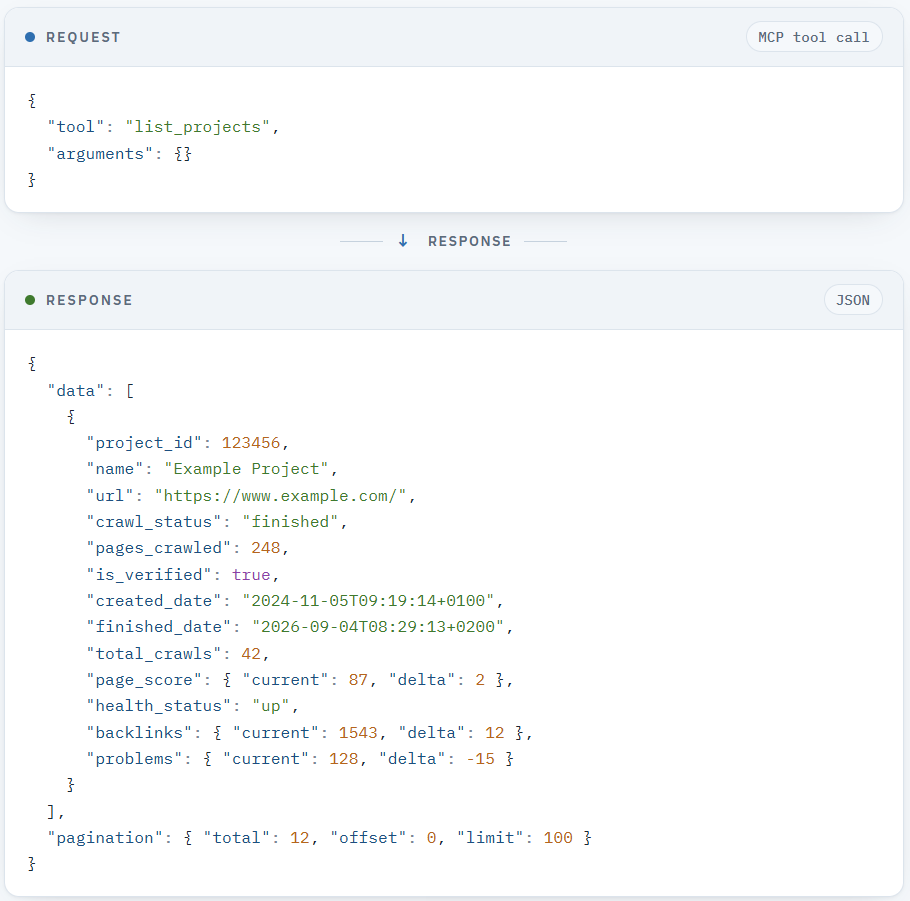
Here's an example of a request/response pair:
Authentication
The Seobility MCP authenticates with your personal Seobility API key. There's no separate login or OAuth step during the beta. The key alone identifies your account and your plan, so treat it like a password and keep it server-side.
Send your key in a request header:
X-Seobility-Authorization: <your-api-key>
If your client only supports bearer-token authentication, you can send the same key as a standard Authorization header instead:
Authorization: Bearer <your-api-key>
Use whichever your client supports. For most setups (Claude Code, Cursor, and similar config-file clients), the X-Seobility-Authorization header is the straightforward choice, and it's the one shown in the setup guide.
💡 Good to know: Your key grants full access to your account's data and, through the write tools, the ability to change it (for example to add keywords). It can read and add, but it can never delete anything from your account. If your key is ever exposed, contact support at [email protected] and we'll reset it.
How MCP credits work
Requests you make through the Seobility MCP use MCP credits. Credits keep usage fair, so that no single account can overload our live tools by running them non-stop.
You can check your remaining balance at any time, and live-tool responses also report the balance back to you, so your assistant can keep track as it works. MCP credits are included with your paid plan, and additional MCP credits will be available as an add-on later on.
During the beta, you also get higher credit limits so you have room to explore. See the setup guide for the limits included with each plan.
What the Seobility MCP can reach
The server groups its tools into modules that mirror the main areas of Seobility. At a high level, your assistant can work with:
- Projects and crawls: list your projects, read a project's settings, and start or stop a Website Audit crawl.
- Website Audit (site level): read a crawl's overview, its prioritized issues, score distribution, HTTP status spread, and click-depth data for the whole site.
- Website Audit (page level): inspect a single crawled URL in detail: its meta tags, headings, internal and external links, content, and the issues found on it.
- Ranking Monitoring: read your tracked positions across Google and in Google AI Overviews, over time and by country, plus ranking winners and losers, ranked landing pages, and competitor positions.
- Keyword research (live): run live keyword lookups: suggestions, related and similar terms, questions, search volume, and competition data.
- Backlinks: read your backlink profile, new, lost, and broken links, anchor texts, top linking domains, and link-building suggestions.
- Competitors: track and compare competitor performance in rankings and backlinks, and get competitor suggestions.
- Uptime Monitoring: read availability, downtimes, and server response-time data for your monitored sites.
- Live SEO tools: run on-demand checks on any URL or keyword, for example a single-page SEO check or a TF*IDF content analysis, without adding the site to a project.
- Reports: pull your existing Seobility reports so your assistant can turn them into summaries or hand them to another tool.
- Account and credits: read your account details, plan limits, and MCP credit balance, and manage sub-accounts.
Your AI assistant chooses among these automatically based on what you ask. You never call a tool by name yourself unless you want to.
Conventions worth knowing
A few patterns run through the whole server. They're useful to know if you're debugging a call or building your own integration:
- Projects are identified by a numeric ID. Most tools need a project_id to know which of your projects to work on. Your assistant can list your projects to find the right one.
- Long lists are paginated. List responses come back with a total, offset, and limit, and page through results 100 at a time by default.
- Search engines use domain notation. Use google.de, google.com, and so on. Short forms like google or google_de are rejected.
- You can target the previous crawl. Where a tool supports it, an option lets it run against your second-to-last completed crawl instead of the most recent one, which is handy for before-and-after comparisons.
Finding the full list of tools
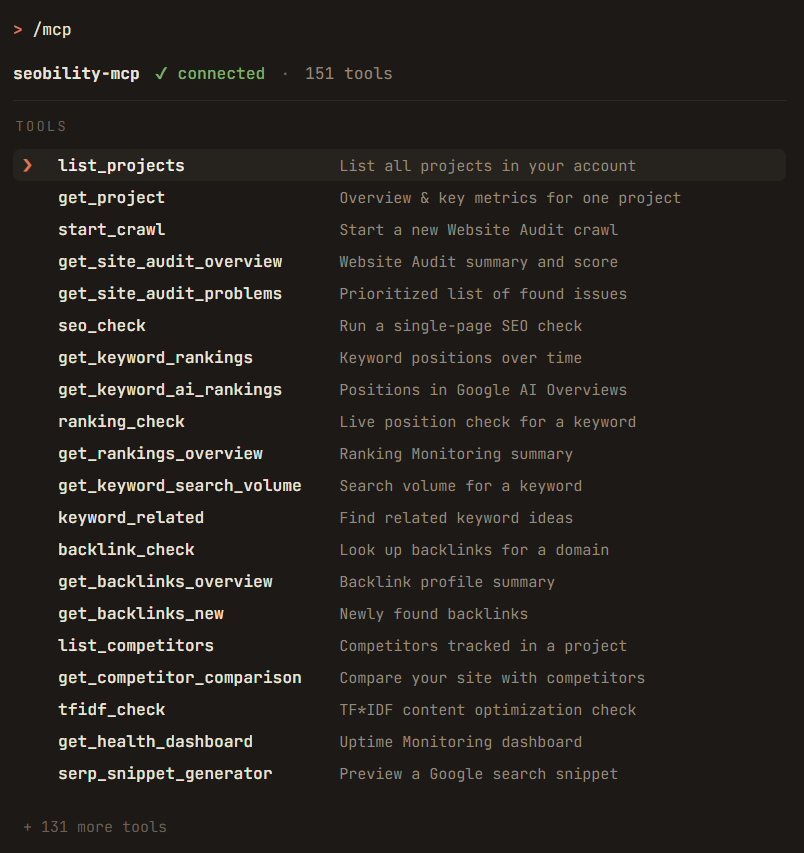
You don't need a static list to know what's available. Because the server is self-describing, your client always has the full, current catalogue of tools your key can access, each with its parameters, through the MCP tools/list method. This is the source of truth: it's fetched live from the server, so it's never out of date. In an interactive Claude Code session, running /mcp shows the connected seobility-mcp server and its tools; other clients surface the same list in their connected-tools view.
Need more help?
- 📩 Reach our support team anytime at [email protected].
- 💬 You're using the Seobility MCP while it's still in beta, so your feedback genuinely shapes it. Tell us what's working and what isn't.
Thanks for working with the Seobility MCP. 💙