
AI Visibility Tracking (Beta)
When someone asks ChatGPT or Google's AI to recommend a tool, product, or service in your field, does your brand come up, or does a competitor take the spot?
You can rank well on Google and still be missing from the answers AI tools give. With Seobility’s new AI Visibility Tracking, you can finally see whether your brand shows up in AI answers, how often, how it's described, and how you compare with your competitors.
AI Visibility Tracking is currently in beta, so you're among the first to try it! This guide explains what it does, how to set it up, how to choose the right prompts to track, and how to actually improve your AI visibility with these insights.
What is AI Visibility Tracking?
AI Visibility Tracking monitors your brand across AI-powered search platforms, in a similar way to how Ranking Monitoring tracks your keywords on Google. You define the questions your customers are likely to ask an AI tool, choose your markets and the AI platforms you want to watch, and add your brand and competitors. Seobility then checks the AI answers for those questions every day*.
(*Please note that daily checks are only available on the Premium, Professional, and Agency plans.)
It helps you answer questions like:
- Does my brand appear in AI answers, and how often?
- Is it mentioned before or after my competitors?
- Is it described positively, neutrally, or negatively?
- Which websites do AI tools use as sources?
- For which questions is my brand still missing?
You can track your visibility across four platforms: ChatGPT, Gemini, Google AI Overviews, and Google AI Mode. You choose which of them to monitor. How many are available depends on your plan.
Why you should track your AI visibility
A strong Google ranking no longer provides a complete picture of your SEO performance. AI tools often use different sources, name different brands, or answer a question without linking to anyone at all. So a brand can be highly visible on Google and almost invisible in AI answers, or the other way around.
Tracking your AI visibility lets you watch this new part of search, find out where competitors are getting mentioned instead of you, and get an early advantage, while many businesses still aren't paying attention to AI search.
How to set up AI Visibility Tracking
Setup is a guided, one-time process inside your existing Seobility project. Seobility pre-fills most of it from what it already knows about your website, so you can usually get through it in a few minutes.
1. Open AI Visibility in your project. In the left-hand menu of your project, click AI Visibility. If you haven't set it up yet, the guided setup ("Set up AI Visibility") opens automatically. It walks you through four steps: Your brand, Prompts, Competitors, and Tracking.
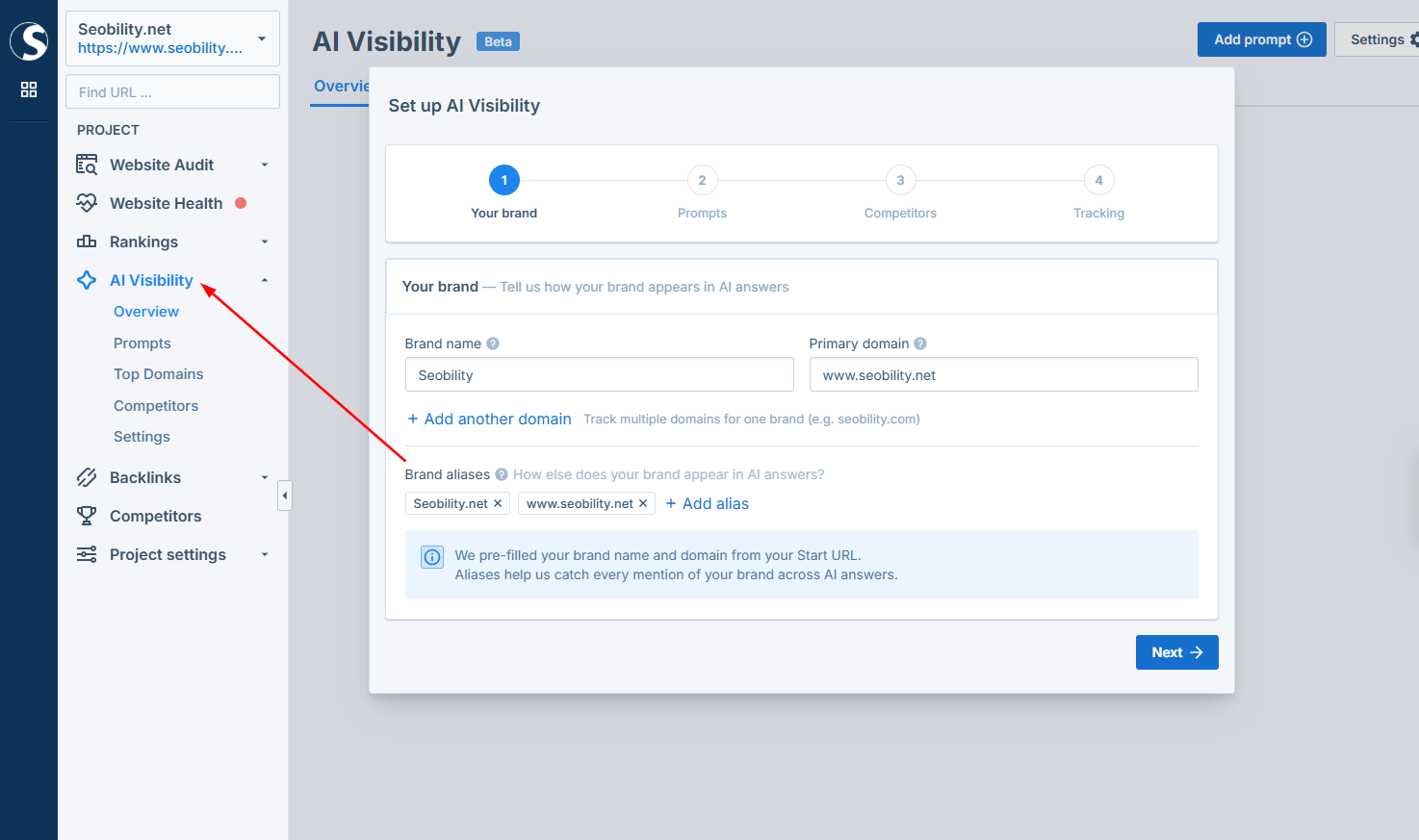
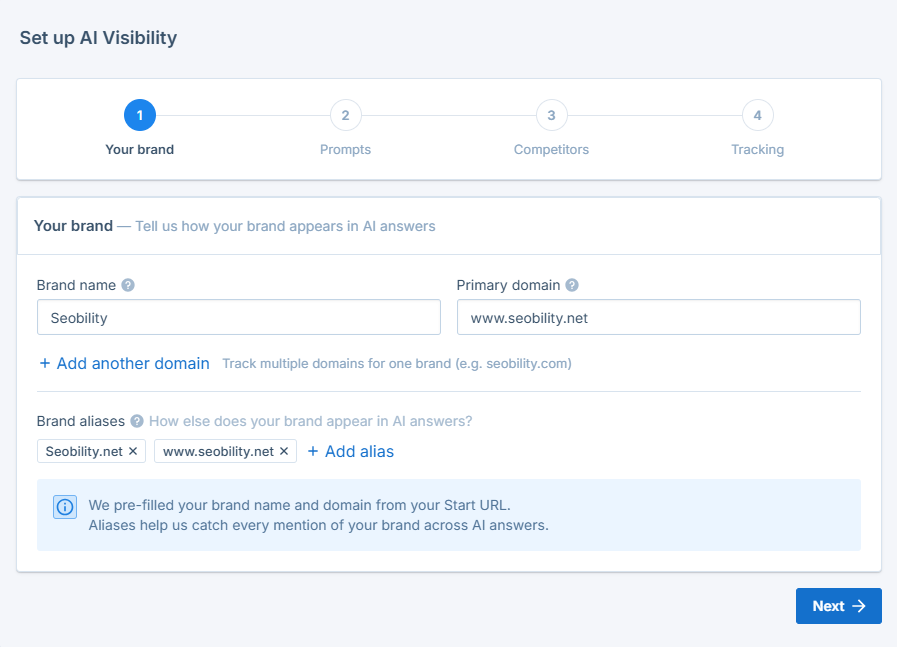
2. Confirm your brand (Step 1: Your brand). Check your brand name and primary domain, which are pulled from your project. Then add aliases: any spellings, abbreviations, or name variants people use for your brand. This is important because AI answers won't always write your name exactly as you do, and Seobility only counts a mention when it recognizes your brand. If your brand runs on more than one domain, add those under additional domains.
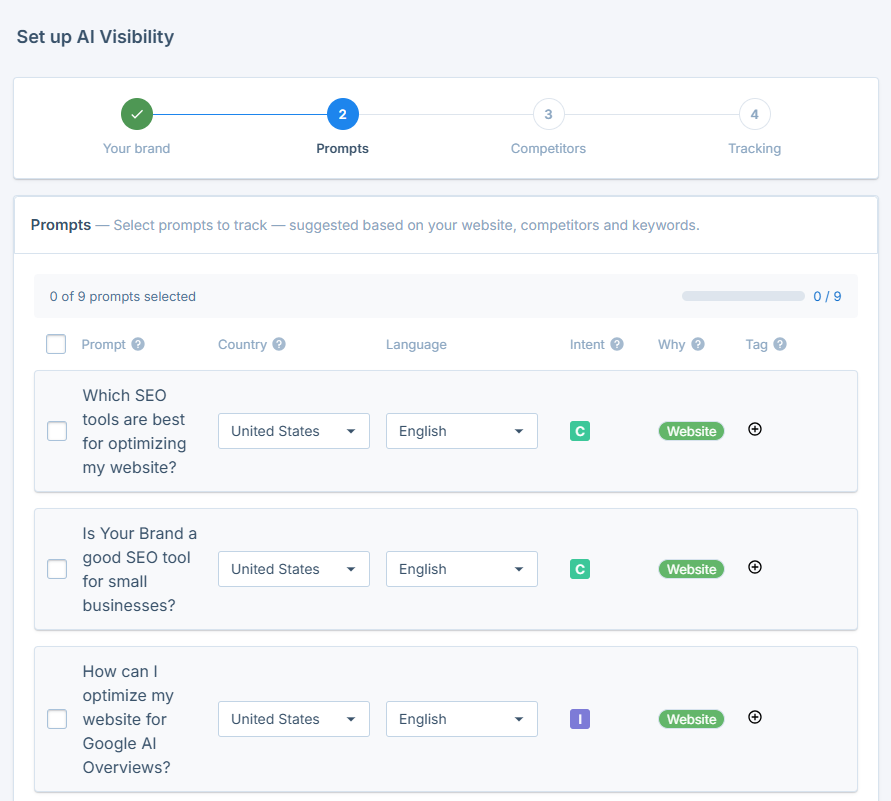
3. Choose your prompts (Step 2: Prompts). Prompts are the questions Seobility sends to the AI platforms. Seobility suggests prompts based on your website, your tracked keywords, and your competitors, and you can add your own. Select the ones that fit your business, set the country and language for each, and add a tag if you want to group them. Getting this step right has the biggest impact on how useful your results are (more on this later).
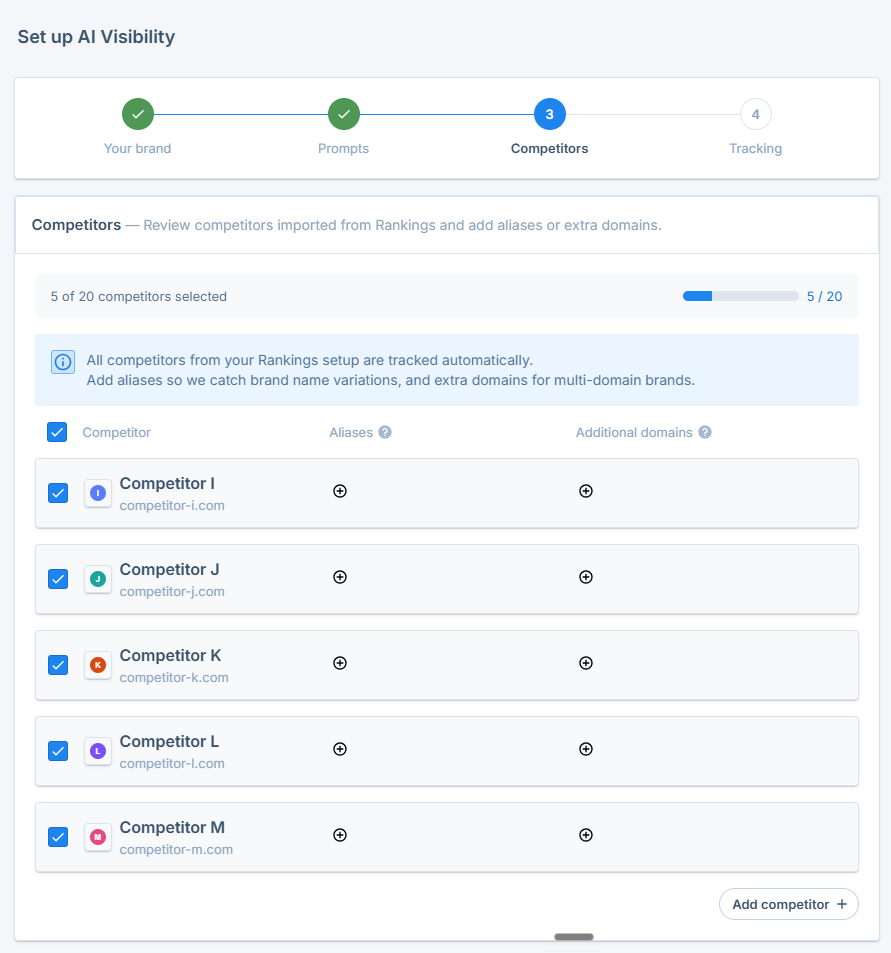
4. Review your competitors (Step 3: Competitors). The competitors from your Ranking Monitoring setup are imported automatically as a starting point. Review the list, and for each one add aliases so name variations get caught. You can also add competitors that aren't in your project yet.
Please note that AI Visibility keeps its own competitor list, separate from the one in Ranking Monitoring. The reason: here, one competitor can have several domains. If a competitor runs more than one website, for example example.com and example.de, add all of them as additional domains so every mention gets counted.
5. Select your AI platforms (Step 4: Tracking). Choose which AI platforms to monitor: ChatGPT, Gemini, Google AI Overviews, and Google AI Mode. You can pick any of them, and your plan decides how many you can track at the same time. Your platform choice applies to all of your prompts at once. Want to track all four platforms, or more prompts than your plan includes? Book one of our add-ons. When you're done, click “Start tracking”.
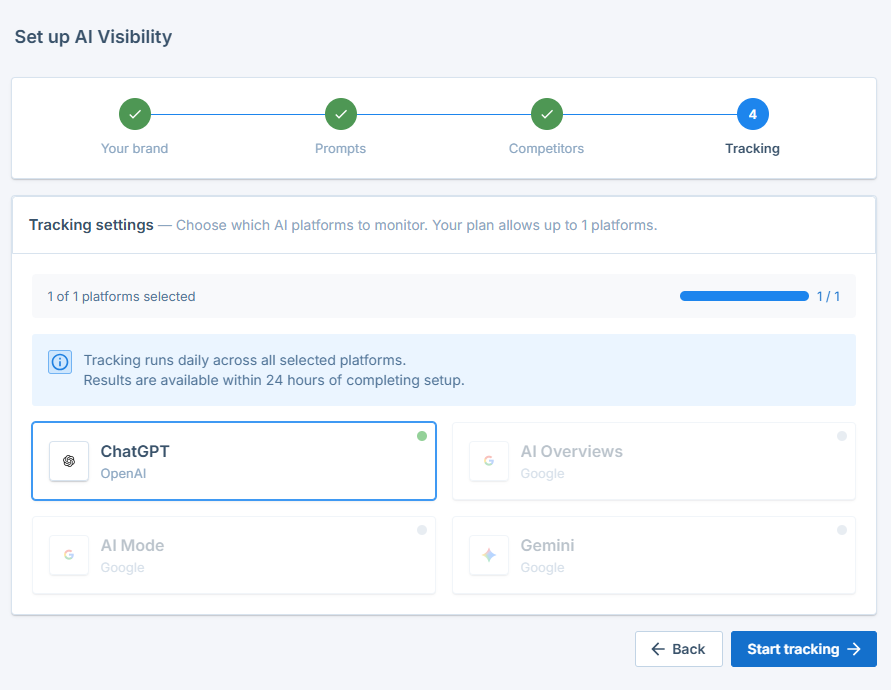
6. Wait for your first results. Tracking runs every day on the Premium, Professional, and Agency plans and once a week on free plans. Your first results appear within 24 hours of finishing setup.
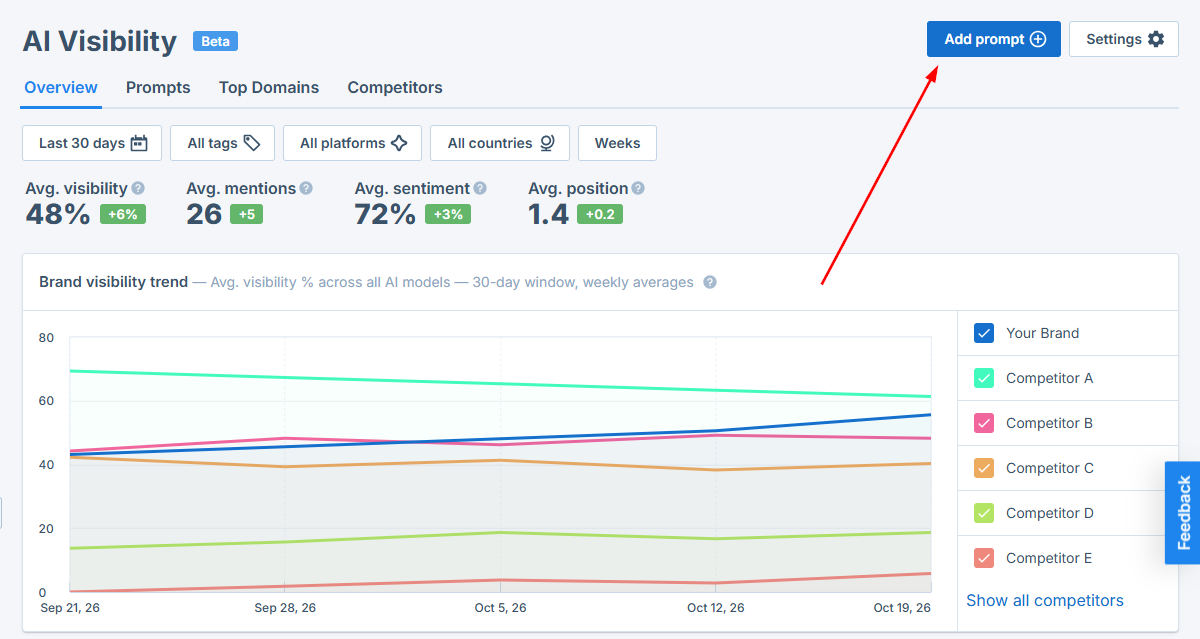
💡 Good to know: You can still adjust all of these settings later. Head to AI Visibility → Settings to edit your brand, aliases, competitors, and tracked platforms, or use "Add prompt" at any time to track a new question.
How to choose the right prompts to track
This is the part that decides how much value you get from the feature. Your results only reflect the prompts you track, so a well-chosen prompt set is really important. Here's how to build a good one.
Think like your customer, not like an SEO
Write the natural questions a real person would type into ChatGPT or Google's AI when they're looking for what you offer. Full, conversational questions work best, not single keywords. Instead of "project management software", track "What's the best project management tool for a small remote team?"
Focus on questions that don't name your brand
A prompt that already includes your name ("Is Seobility any good?") will almost always mention you, so it tells you little about whether new customers can find you. The valuable prompts are the ones where someone describes a need without knowing you yet. "Which SEO tools are good for beginners?" tells you far more than "Tell me about Seobility."
Use different types of questions
Mix problem questions, category and "best of" questions, comparison questions, and alternatives to competitors. Together they show where you are present across the whole buying decision, not just at one point. "How do I improve my Google rankings?", "best all-in-one SEO software", "alternatives to [competitor]".
Be specific enough to reach the right audience
Very broad prompts attract answers full of big, generic brands and rarely reflect where you can realistically compete. A more specific prompt can reflect the target group that’s actually relevant to your business. "Best SEO tool for a local business on a budget" beats a bare "best SEO tool".
Match the market and language to your customers
Set the country and language on each prompt so the answers come from the market you actually sell in. The same question can get very different answers in different countries.
Start from Seobility's suggestions, then refine
The suggested prompts are built from your website, keywords, and competitors, so they're a solid starting point. Keep the ones that match your business, edit the wording to sound like your customers, and ignore any that don't fit.
💡 Good to know: Try to settle on a prompt set and leave it running. Because your visibility is measured across the prompts you track, adding or removing prompts frequently changes your scores and makes it harder to compare over time. It's better to choose carefully up front than to keep swapping prompts in and out.
Understanding your results
Once tracking is running, your data is organized into five views, which you'll find in the AI Visibility menu and as tabs at the top of the dashboard.
Overview: your progress at a glance
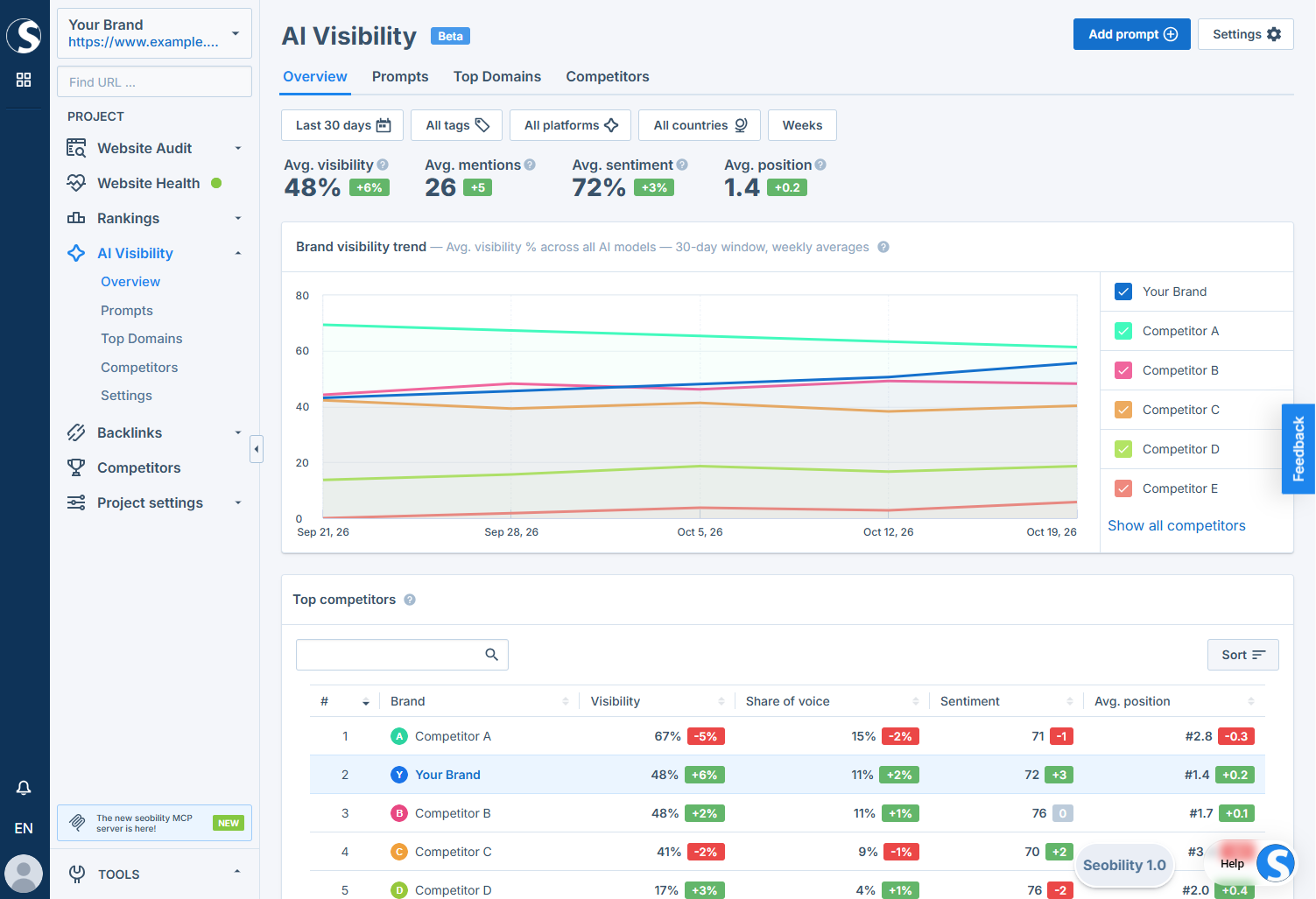
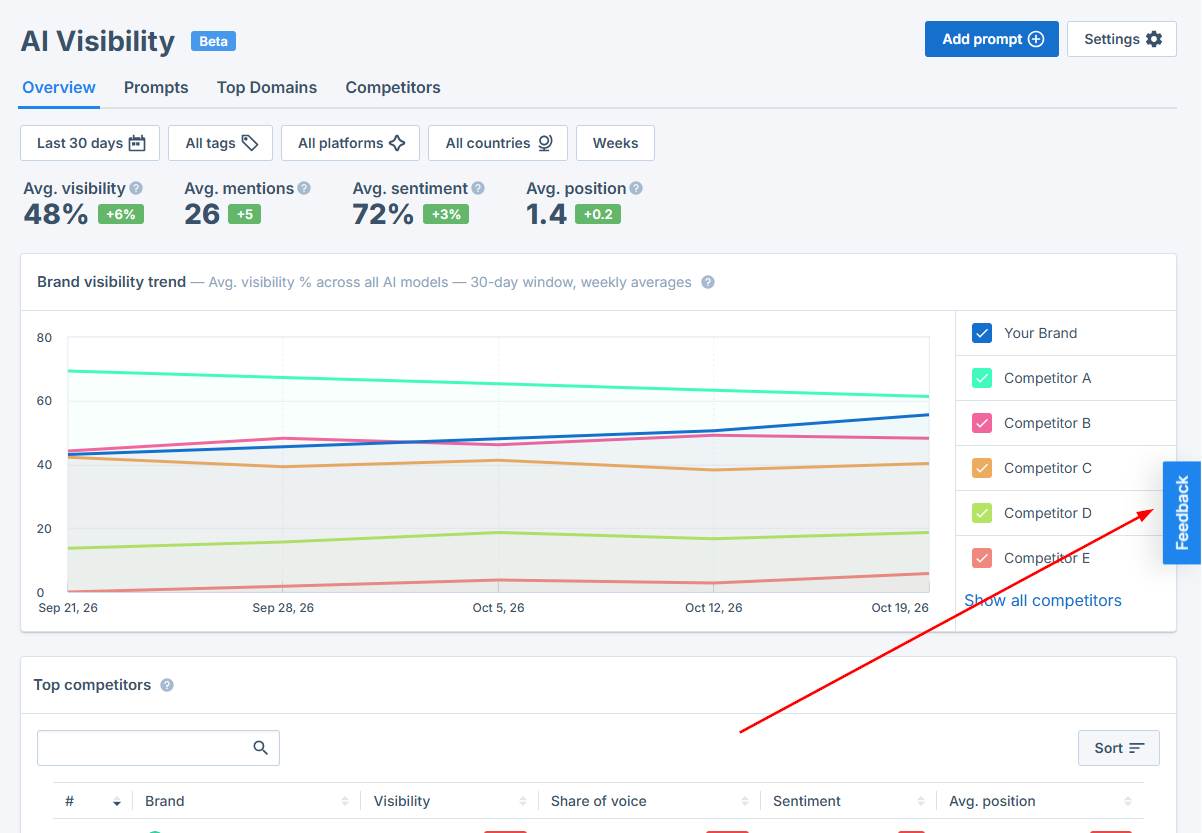
This tab provides an overview of your most important metrics (average visibility, mentions, sentiment, and position) plus a trend chart and your top competitors. This is where you check whether you're gaining or losing ground. If your visibility line is climbing and your position number is falling, you're being named more often and earlier, so what you're doing is working. If it's flat or dropping while a competitor's line rises, they're ahead of you, and you should dig into the Prompts view to see where.
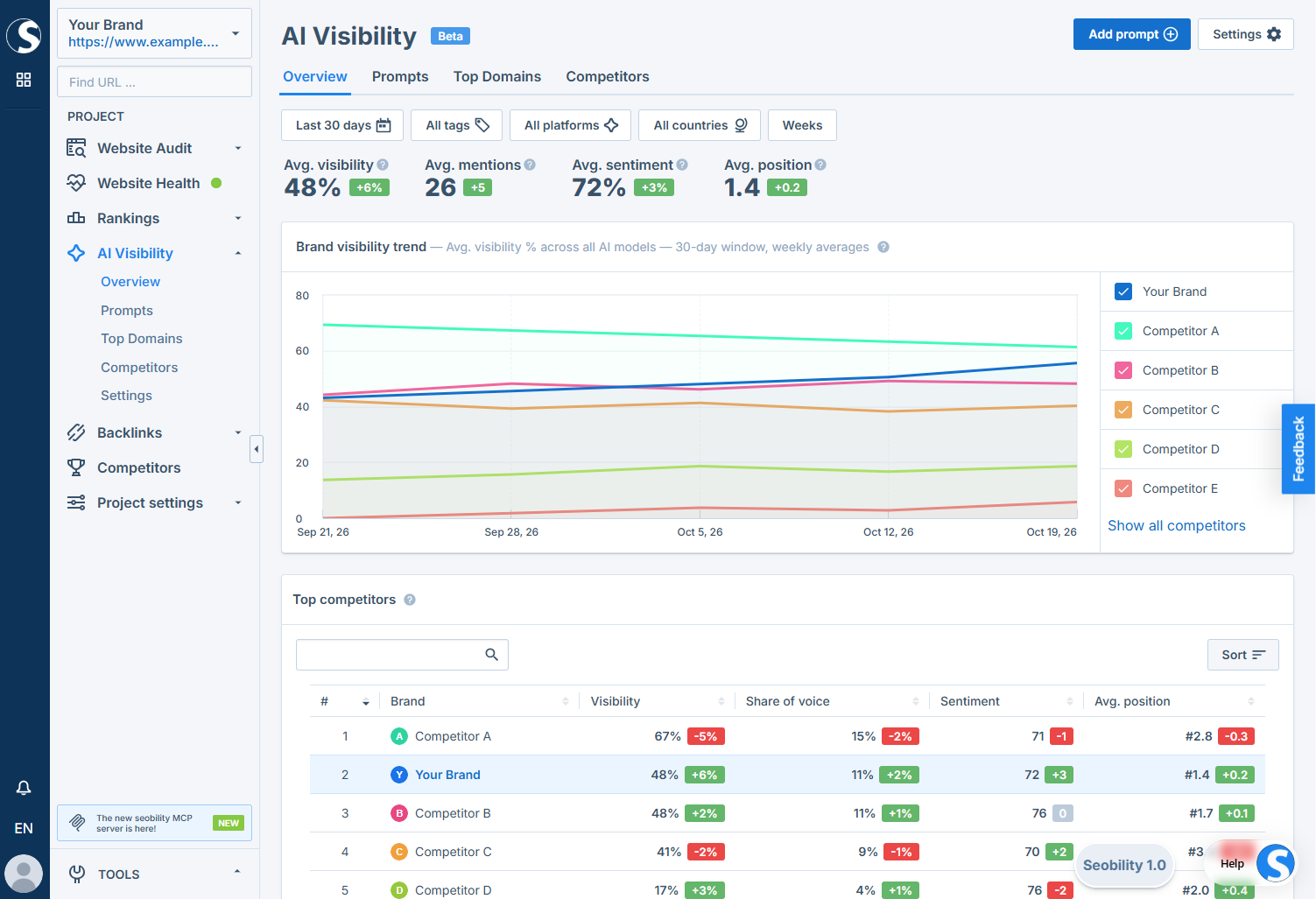
Here's what the main metrics mean:
- Visibility: how often your brand appears in the AI answers for your tracked prompts.
- Mentions: the number of times your brand is named across those answers.
- Sentiment: whether your brand is described positively, neutrally, or negatively, shown as a score (higher = more positive).
- Average position: where your brand tends to appear in an answer. A lower number is better, since it means you're named earlier.
- Share of voice: how much of the total attention across your tracked prompts goes to you compared with your competitors.
Prompts: your to-do list
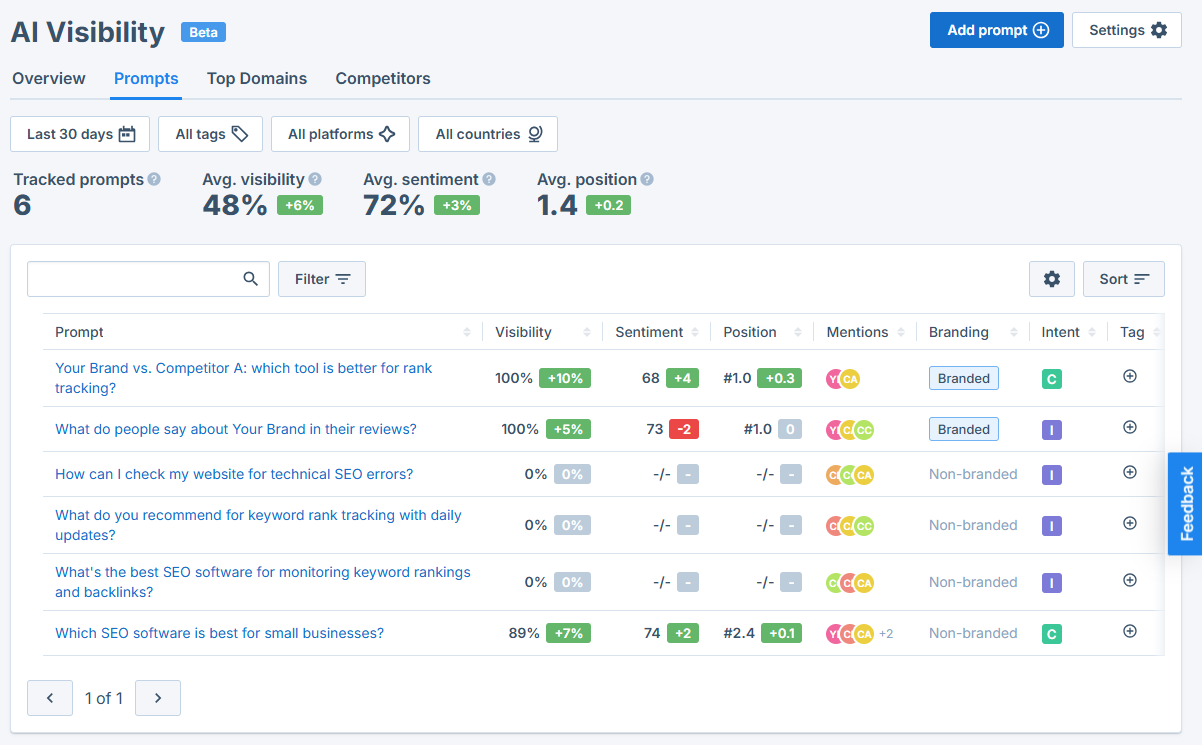
Here you’ll see every prompt you track, with its own visibility, sentiment, position, and mention count. The prompts where your visibility is low or zero show you where you have room to grow: these are real questions your customers ask where a competitor gets recommended instead of you.
Switch to the Chats tab to read the actual AI answers for these prompts. They can reveal why the AI recommends a competitor over you: often it points to a feature you also offer but don't highlight, a price or plan it names, a specific use case, or a review site it trusts. Address those exact points on your own pages, and, if possible, try to get included on the sources the answer cites.
Top Domains: where AI gets its information
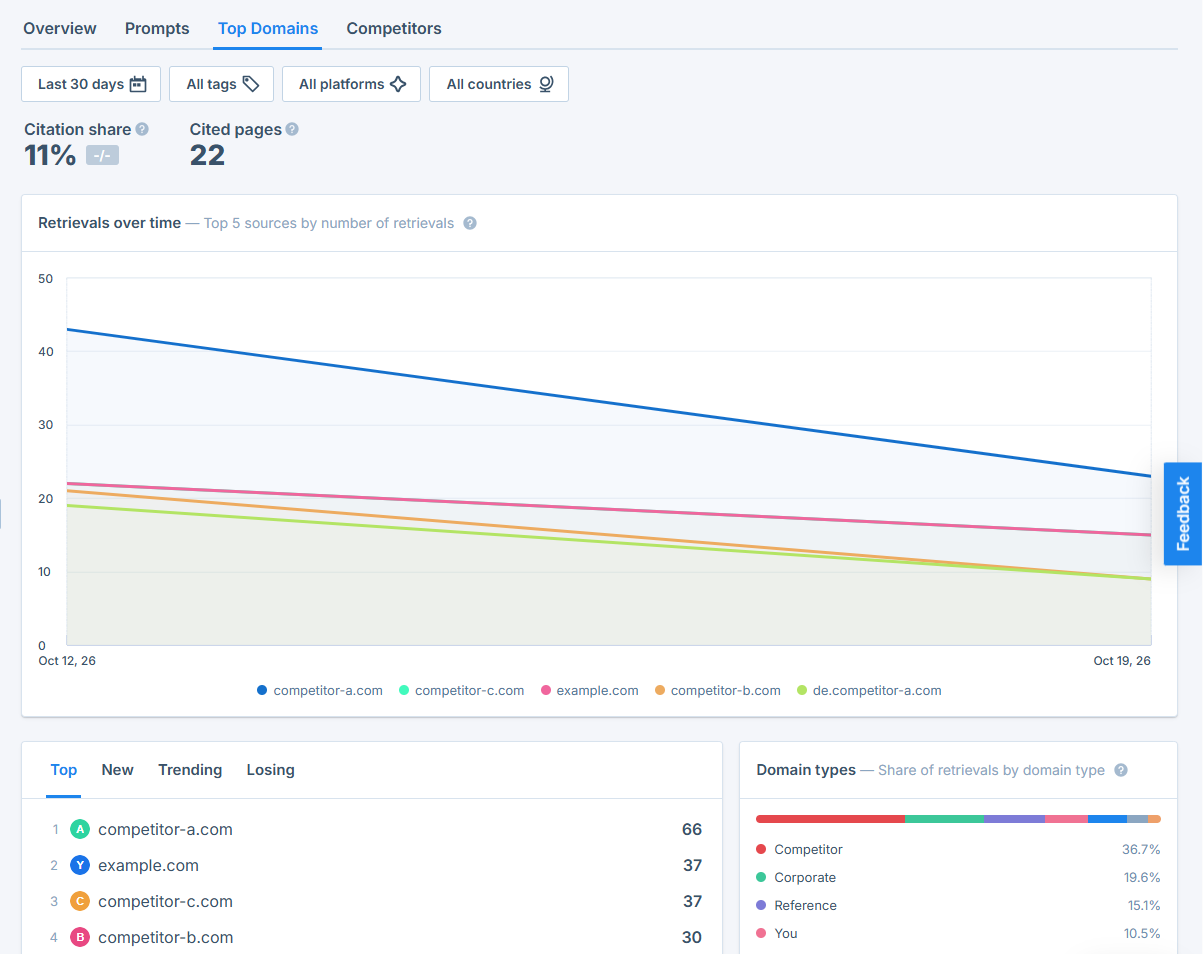
This tab lets you find out which sources AI tools cite most often for your prompts, plus your own citation share. Because AI answers lean on these sources, these domains show you where you should try to get your brand mentioned: editorial sites, industry publications, communities, or comparison pages in your niche.
Your own citation share shows how often AI uses your site when it answers these prompts, and Cited pages shows how many of your pages it used as a source. If both are low, AI is using other sources instead of you. To improve them, try to get featured on the domains it does cite, or answer the same questions on your own pages more thoroughly than those sources do.
The Domain types chart shows what kind of sources AI relies on: user-generated content (UGC) such as forums, communities, and review sites, editorial sites such as magazines and blogs, and your own website (You). This tells you where your effort pays off most. If UGC dominates, being present in relevant communities and on review platforms matters most. If editorial sources dominate, articles, guest posts, and comparison pages in your niche are the way in.
Use the Top, New, Trending, and Losing tabs to see which domains are cited most often, which have just started appearing, which are gaining ground, and which are cited less and less.
Competitors: compare your performance
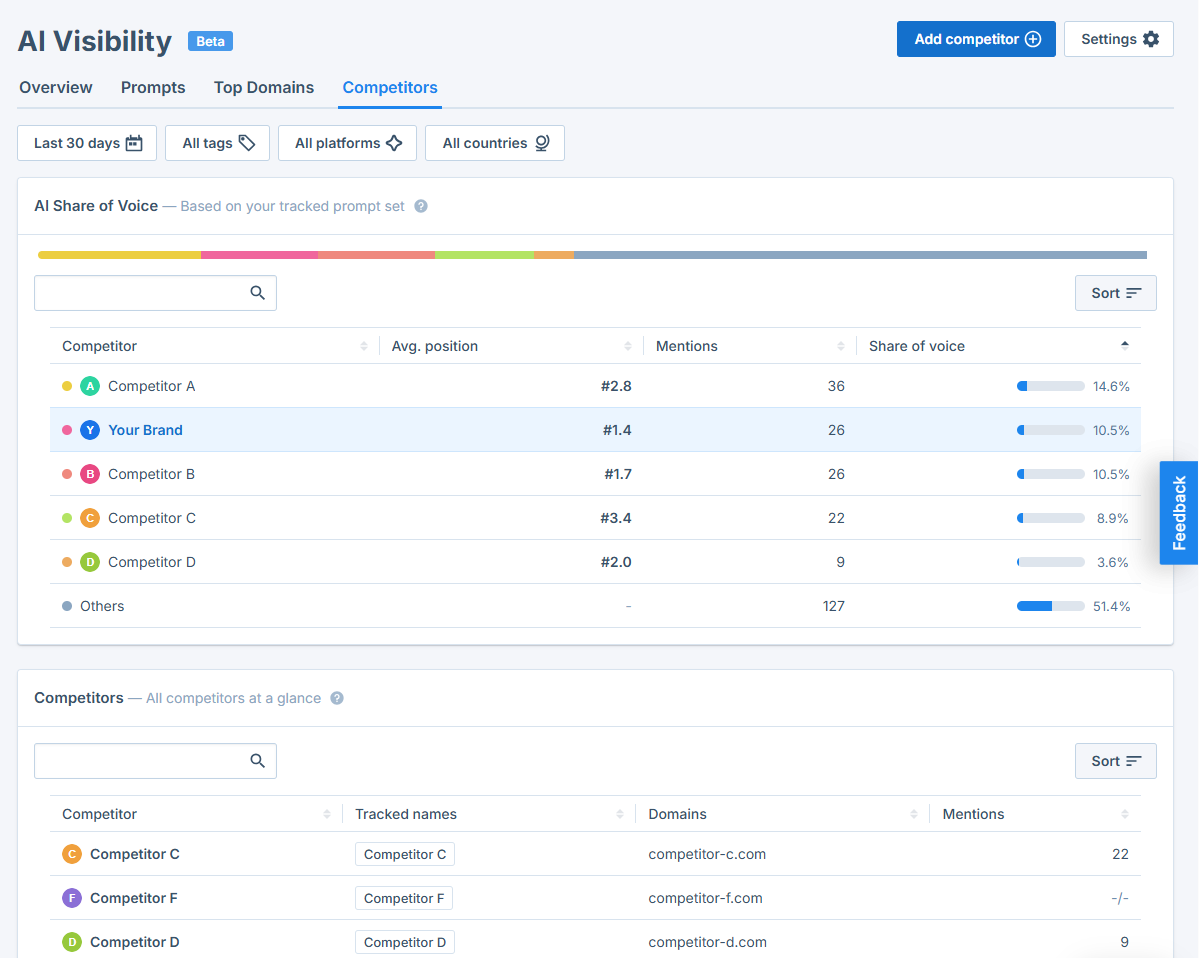
Here you’ll find each competitor's share of voice, mention count, and average position across your tracked prompts. A competitor with a high share of voice and a low position number is dominating the questions you’re tracking. Comparing their numbers with yours shows you where they're named and you're not, and watching your share over time tells you whether you're closing that gap.
Please note: Your AI Visibility competitors are a separate list from the competitors in Ranking Monitoring and Backlink Monitoring, because in AI Visibility, one competitor can have several domains. They're imported once during setup, and from then on you manage them here in the AI Visibility settings.
Settings
This is where you can manage your brand name, aliases, domains, competitors, and tracked platforms after setup.
How to improve your AI visibility: your next steps
AI Visibility Tracking shows you where you stand. Here's how to turn that into more mentions, step by step.
1. Find your gaps. In the Prompts view, start with the prompts where your visibility is low or zero. These are the questions where AI recommends a competitor instead of you.
2. Read the AI answers. Open the Chats tab for those prompts and note what the AI says about the brands it recommends: features, prices, use cases, and the sources it relies on.
3. Close the gaps on your own pages. Cover those exact points on your website, in clear and specific wording. Answer the question behind each prompt directly. That makes it easier for AI tools to use your page as a source.
4. Get mentioned where AI looks. Check Top Domains for the sites AI cites most often for your prompts. Try to get featured there, for example with a guest article, a spot in a comparison or "best of" list, a profile on a review platform, or helpful answers in relevant communities.
5. Learn from your competitors. In the Competitors view, check who leads your prompts. Read their mentions in the chats to understand why AI recommends them.
6. Track the effect over time. AI answers change often, so give your changes a few weeks. Keep your prompt set stable and watch your visibility, citation share, and share of voice in the Overview.
Good to know before you read too much into the numbers
AI Visibility Tracking is a trend-monitoring tool, not an exact ranking system, and a few things are worth keeping in mind.
AI answers change often
The same prompt can produce different answers from one day to the next, driven by the platform, the underlying model, or the sources it uses. That's why Seobility reports averages and trends rather than a single fixed rank. Watch the direction over time rather than any single day.
Your score reflects your prompt set, not the whole internet
It measures how you perform across the prompts, markets, languages, and platforms you chose. It isn't a universal score, and changing your prompts changes it.
The numbers are indicators, not outcomes
Higher visibility means your brand is appearing more often or more prominently in AI answers. It's a strong signal, but it doesn't guarantee more traffic, leads, or sales.
💡 What AI Visibility Tracking doesn't do: It doesn't get your brand into AI answers for you, and it doesn't improve your AI visibility automatically. It shows you where you stand and where the opportunities are, so you know where to focus. To actually earn more mentions, use those insights to strengthen your content and your presence on the sources AI tools rely on.
Need more help?
AI Visibility Tracking is in beta, and your feedback will help us decide where it goes next. If something is unclear or you'd like to see it work differently, please let us know through the in-app feedback option!
Questions about your setup or your results? Reach out to our support team any time, we're happy to help. 💙